How MCPs Actually Works
I wire AI agents into production systems for work. The annoying part is never the agent logic itself. It's the glue: every LLM provider has a different function-calling format, every agent framework invents its own tool abstraction, and you end up writing adapters on top of adapters.
Anthropic's Model Context Protocol (MCP) is an attempt to fix this, and after building a few servers with it, I think it mostly works.
TL;DR: MCP is an open protocol that standardizes how AI models discover and call external tools. Below, I build a working MCP server in TypeScript, explain the three primitives (tools, resources, prompts), and go through the gotchas I ran into.
What MCP actually does
Say you want Claude to query your database, pull files from S3, and check CI status. Without MCP, you write tool definitions for each integration, wire up auth, and hope the JSON schema matches what the model expects. Three integrations, three separate plumbing jobs.
MCP inverts the direction. The server advertises what it can do, and the client (Claude, or any MCP-compatible host) discovers those capabilities at runtime over a standard JSON-RPC transport.
The architecture:
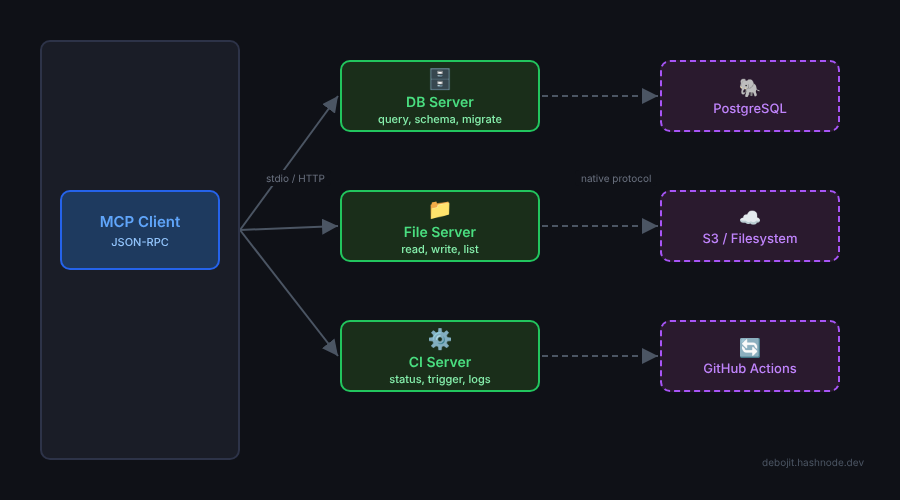
Each server is a separate process. They communicate over stdio (local) or SSE over HTTP (remote). The host doesn't need to know anything about the servers ahead of time.
The three primitives
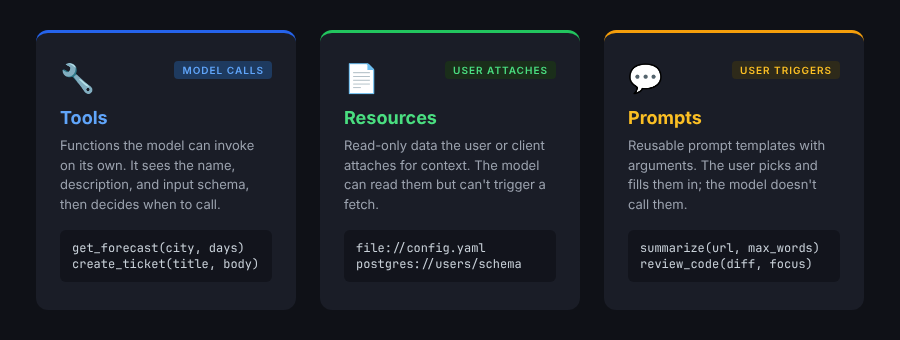
A server can expose three things:
- Tools -- functions the model can call.
query_database(sql),create_ticket(title, body), that sort of thing. The model decides when to invoke them. - Resources -- read-only data the model can pull in for context.
file://config.yamlorpostgres://users/schema. The user or client controls when these get attached. - Prompts -- reusable prompt templates with arguments. User-triggered, not model-triggered.
You'll mostly use tools. That's what I'll focus on.
Building a server
I'll build an MCP server that wraps a REST API. Weather API as the example, because it keeps the focus on MCP mechanics instead of business logic.
Scaffold the project:
mkdir weather-mcp-server && cd weather-mcp-server
npm init -y
npm install @modelcontextprotocol/sdk zod
npm install -D typescript @types/node
npx tsc --init
The @modelcontextprotocol/sdk package is the official TypeScript SDK. zod handles input validation, and the SDK uses it internally for schema generation.
Now the server itself. Create src/index.ts:
import { McpServer } from "@modelcontextprotocol/sdk/server/mcp.js";
import { StdioServerTransport } from "@modelcontextprotocol/sdk/server/stdio.js";
import { z } from "zod";

const server = new McpServer({
  name: "weather",
  version: "1.0.0",
});

server.tool(
  "get_forecast",
  "Get the weather forecast for a city",
  {
    city: z.string().describe("City name, e.g. 'Mumbai'"),
    days: z
      .number()
      .min(1)
      .max(7)
      .default(3)
      .describe("Number of days to forecast"),
  },
  async ({ city, days }) => {
    const API_KEY = process.env.WEATHER_API_KEY;
    if (!API_KEY) {
      return {
        content: [
          {
            type: "text",
            text: "WEATHER_API_KEY environment variable is not set.",
          },
        ],
        isError: true,
      };
    }

    const url = `https://api.weatherapi.com/v1/forecast.json?key=${API_KEY}&q=${encodeURIComponent(city)}&days=${days}`;
    const res = await fetch(url);

    if (!res.ok) {
      return {
        content: [
          { type: "text", text: `API error: ${res.status} ${res.statusText}` },
        ],
        isError: true,
      };
    }

    const data = await res.json();
    const forecast = data.forecast.forecastday.map((day: any) => ({
      date: day.date,
      condition: day.day.condition.text,
      high_c: day.day.maxtemp_c,
      low_c: day.day.mintemp_c,
      rain_chance: day.day.daily_chance_of_rain,
    }));

    return {
      content: [
        {
          type: "text",
          text: JSON.stringify(forecast, null, 2),
        },
      ],
    };
  }
);

async function main() {
  const transport = new StdioServerTransport();
  await server.connect(transport);
}

main().catch(console.error);
That's the whole server. The pieces worth noting:
McpServer handles protocol negotiation and request routing. You never write JSON-RPC by hand.
server.tool(name, description, schema, handler) registers a tool. The schema uses Zod; the SDK converts it to JSON Schema for the client. The handler returns content blocks (text, images, embedded resources) with an optional isError flag.
StdioServerTransport talks over stdin/stdout, which is what Claude Code and Claude Desktop use for local servers. For remote deployment, you'd swap it for an HTTP transport.
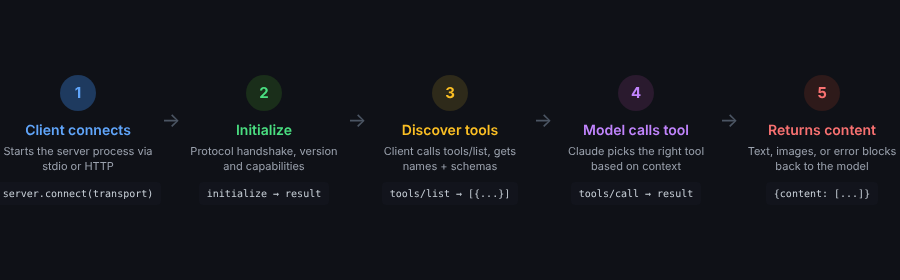
Here's the full lifecycle of a tool call, from connection to response:
Compile and test:
npx tsc
printf '{"jsonrpc":"2.0","id":0,"method":"initialize","params":{"protocolVersion":"2024-11-05","capabilities":{},"clientInfo":{"name":"test","version":"1.0.0"}}}\n{"jsonrpc":"2.0","id":1,"method":"tools/list"}\n' | node dist/index.js
You should see two JSON responses: the initialize handshake, then your tool's name, description, and input schema.
Hooking it into Claude
To use this with Claude Code, add a server entry to your Claude config. Create or edit .claude/settings.json:
{
  "mcpServers": {
    "weather": {
      "command": "node",
      "args": ["/absolute/path/to/weather-mcp-server/dist/index.js"],
      "env": {
        "WEATHER_API_KEY": "your-api-key-here"
      }
    }
  }
}
Restart Claude Code. It picks up the server, reads its tool list, and get_forecast shows up as a callable tool. No plugin system, no marketplace.
For Claude Desktop, same format, different file: claude_desktop_config.json (location depends on OS).
Adding a resource
Tools are model-triggered. Resources are for context the user or client attaches. Here's an example that exposes a resource:
server.resource(
  "api-status",
  "weather://api-status",
  { mimeType: "application/json" },
  async () => ({
    contents: [
      {
        uri: "weather://api-status",
        text: JSON.stringify({
          provider: "WeatherAPI",
          plan: "free",
          calls_today: 142,
          limit: 1000,
        }),
      },
    ],
  })
);
When a user asks "how many API calls have I used today?", they can attach this resource to give Claude the context to answer, without the model needing to call a tool.
Gotchas
Stdio and console.log don't mix. console.log writes to stdout, which is the same channel MCP uses for JSON-RPC. Your debug output will corrupt the protocol stream and kill the connection. Use console.error, or write to a file.
Zod version mismatches. The SDK ships its own Zod. If your project pins a different version, you'll get confusing schema validation failures. Stick to the same major version the SDK uses.
Unhandled throws crash the server. If your tool handler throws, the whole process dies and the client loses the connection. Catch errors and return them as isError: true content blocks instead. Claude handles error responses well and usually explains the failure or retries.
Vague tool descriptions cause misfires. Claude picks tools based on name and description. "Does weather stuff" will get invoked at the wrong times. Write something specific: "Get the weather forecast for a city, returning temperature highs/lows and rain probability for 1-7 days."
Transport is a deployment choice. Stdio works locally. For a shared server, you want HTTP. The SDK supports both, but remote servers need their own auth layer since MCP doesn't handle authentication.
Where things stand
The official registry lists thousands of community-built servers. Anthropic open-sourced reference implementations for filesystem, GitHub, Slack, PostgreSQL, and a few others.
The spec is still moving. Recent changes include streamable HTTP transport (replacing the older SSE-only approach), structured tool output types, and better capability negotiation. If you're building production servers, keep an eye on the spec changelog.
The thing I like most about MCP is the composability. Each server is a self-contained capability boundary. You can combine a database server, a filesystem server, and your business logic server, and the model coordinates between them. That's a much cleaner separation than one giant tool definition that does everything.
Getting started fast
The quickest path:
npx @anthropic-ai/create-mcp-server weather-server
This scaffolds a project with the SDK wired up, a sample tool, and build scripts. Replace the sample with your API calls and you're running.
The MCP docs have quickstart guides for both TypeScript and Python. The Python SDK (mcp) follows the same patterns with async/await.
About the author
- I'm a software engineer with 3+ years of experience building AI-powered products and media-heavy web apps. Day to day I work with React and TypeScript on the front end, and NestJS, Node.js and Python on the back end. I write about the things I've actually built: multi-agent LLM pipelines with LangGraph, canvas and video editors with Fabric.js and FFmpeg, adaptive HLS streaming, and SEO content automation. I also write about Claude, MCP and developer tooling. Expect code-first posts with working examples and the gotchas I hit along the way.
Comments
Join the discussionNo comments yet. Be the first to comment.


